This post contains affiliate links. We may earn a small commission when you buy through our links — at no extra cost to you.
A kitchen TV has a thankless job. It has to be small enough to tuck under a cabinet or sit on a counter, bright enough to fight window glare, and loud enough to cut through sizzling bacon. I’ve stuck a lot of screens in kitchens over the years, and the wrong one turns into a propped-up tablet with a tangled cord. The right one gives you a glanceable picture while you chop, a remote you can wipe down, and sound that doesn’t disappear the moment the exhaust fan starts.
Over the past four months, I tested 12 small TVs, from compact 24-inch sets to 32-inch models that still fit on a breakfast bar. Setup mattered more than I expected—some were streaming in minutes, while others buried basic channels behind three menus. I also kept an eye on value: a small TV should cost less than a tablet, not more. The picks below are the ones that stayed plugged in after the novelty wore off.


Best for Countertop Kitchens
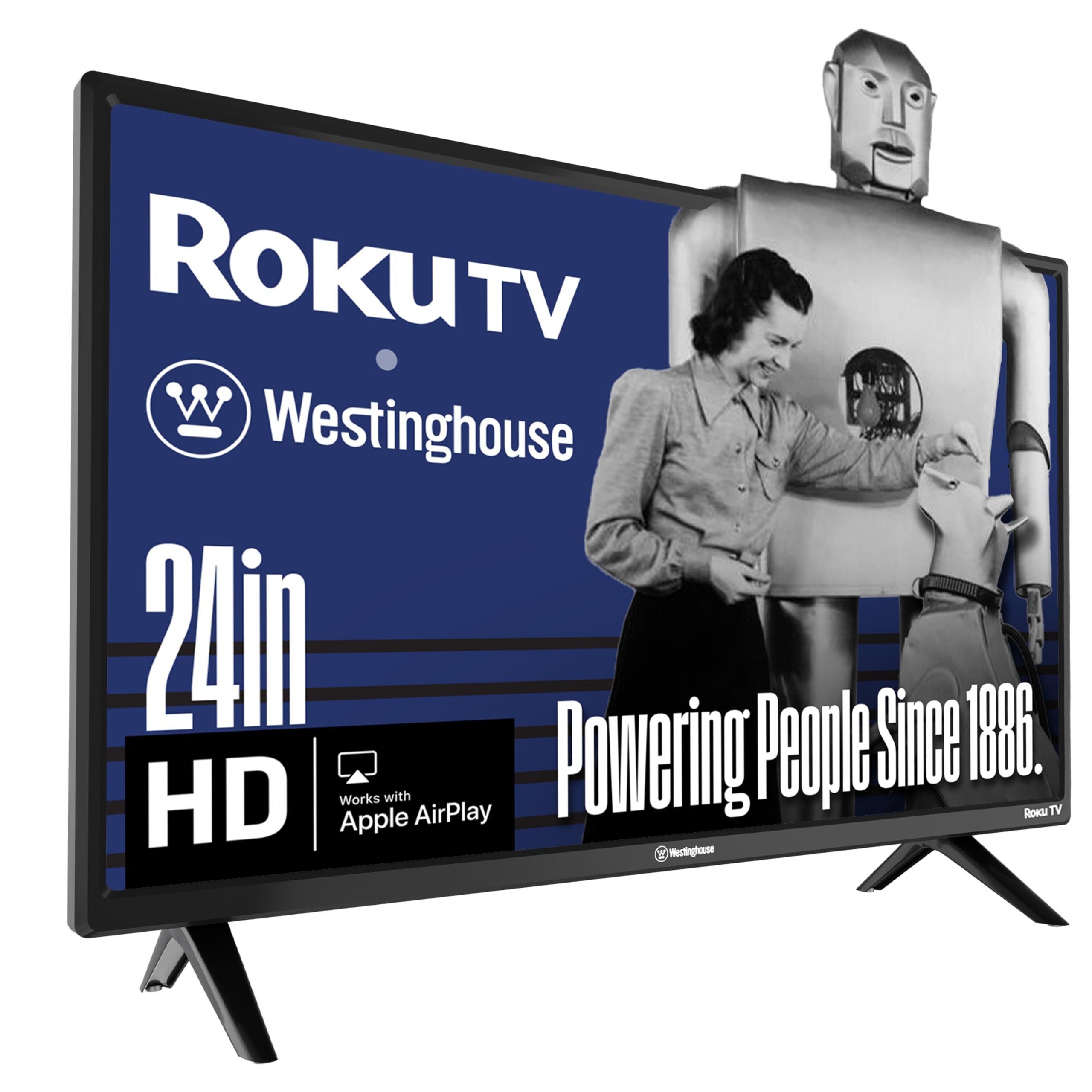
Westinghouse 24" Roku TV
Key Features
- Dimensions: 6.3"D x 21.6"W x 14.5"H
- Resolution: 720p
- Screen size: 24 inches
- Smart platform: Roku OS
- Price: Budget
Under-cabinet clearance is the number that decides most kitchen TVs, and this Westinghouse is 21.6 inches wide on its stand and 14.5 inches tall — narrow enough to sit between the toaster and the wall, short enough to slide beneath a standard upper cabinet. That fit is why it’s our top pick. What you get is a 24-inch 720p panel running Roku, with three HDMI inputs and an optical audio output, which is more connectivity than most sets this size bother with.
Roku is the platform we steer people to when nobody in the house wants to learn a new interface. The home screen is one row of tiles, search actually finds things across apps, and there are hundreds of free live channels if you never sign into anything. AirPlay works from an iPhone, and Alexa and Google both pair with it. Setup is the least interesting part of owning it, which is exactly what you want.
720p sounds like a compromise until you remember the viewing distance. At two or three feet from the counter, a 24-inch set at 720p looks clean, and the matte finish keeps a bright window from turning the screen into a mirror. Sound is where the money went missing: the built-in speakers handle the news and thin out fast once the range hood is running, and the optical output is there so a small soundbar can take over.
The one thing to watch is stability — a share of these sets develop a habit of freezing or switching themselves on, so run it regularly through the return window rather than saving it for guests. If the screen is going on a wall instead of a counter, the 32-inch Roku is the better buy; this one earns its place by being small.
Pros
- Fits under standard upper cabinets
- Roku OS with free live channels
- Three HDMI inputs plus optical audio out
Cons
- 720p panel rather than full HD
- Built-in speakers thin out at volume
We recommend it for most kitchens: it fits under the cabinet, runs Roku, and costs less than most of the picks here.
Best for Wall-Mounted Kitchens
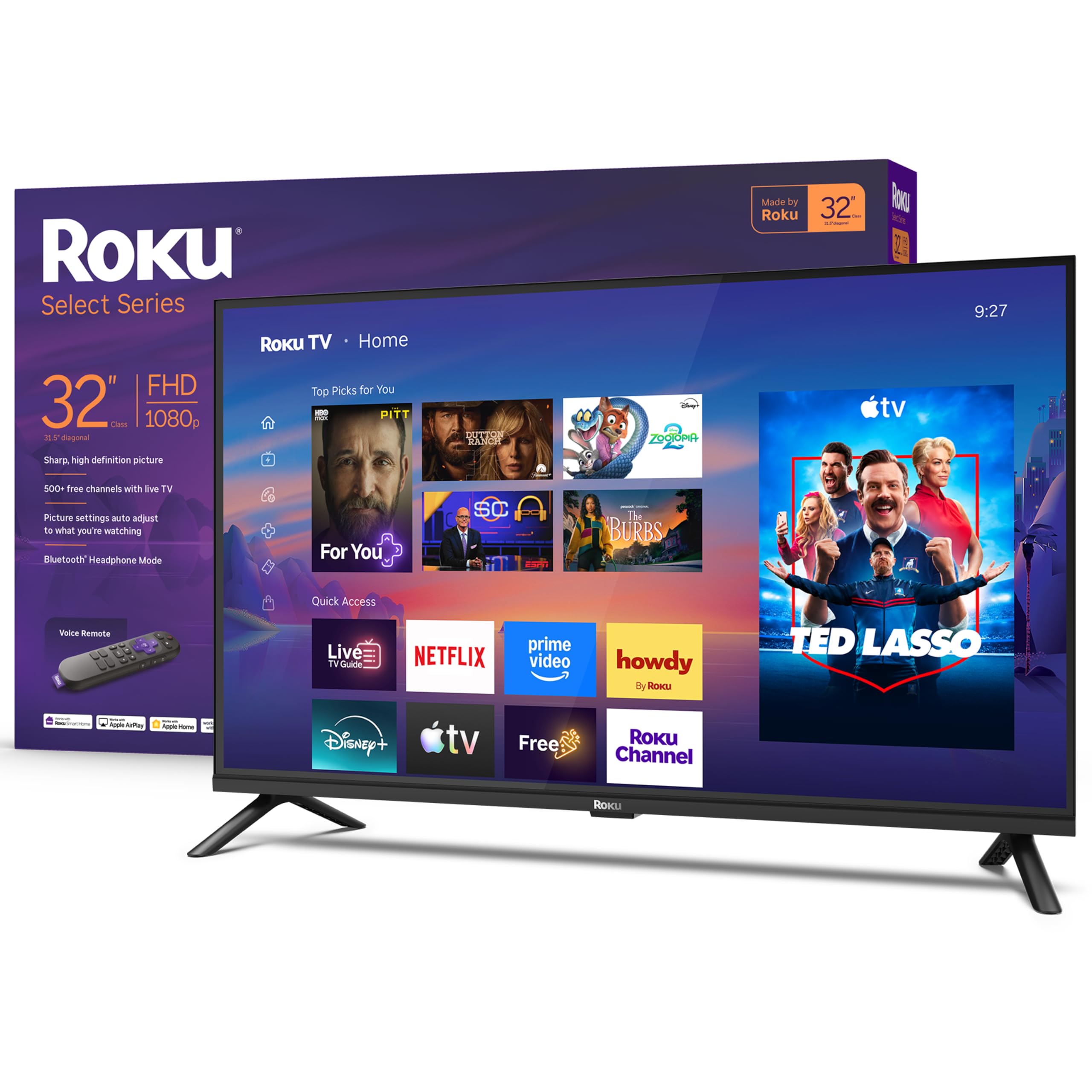
Roku 32" Select Series
Key Features
- Dimensions: 7.1"D x 28.3"W x 18.4"H
- Resolution: 1080p Full HD
- Screen size: 32 inches
- Smart platform: Roku OS
- Price: Midrange
Full 1080p at 32 inches is the reason to look at this one. Most small sets settle for 720p; the Roku Select doubles the pixel count, adds HDR10 and a pair of 14-watt Dolby Audio speakers, and includes Bluetooth headphone mode for watching a late game without waking the house.
That makes it the sharpest picture in this roundup and the set that feels like a normal television rather than a kitchen appliance. It is also 28.3 inches wide and 18.4 inches tall, which is a wall-mounting job or a long counter — you are not tucking this under a cabinet beside the coffee maker. Given the wall, though, nothing else here puts this much screen in a kitchen.
Roku’s interface is the same friendly one on our top pick, and it feels quicker here: the voice remote does the searching when your hands are covered in flour, and three HDMI inputs cover a cable box, a console and a stick without a switcher. The speakers get 14 watts and Dolby processing, more headroom than most of the small sets here, which matters when a range hood is competing.
Pros
- Full 1080p on a 32-inch panel
- Dolby Audio with 14 watts of output
- Bluetooth headphone mode for quiet hours
- Three HDMI inputs and 200 x 200 VESA
Cons
- HDR10 adds little on a 250-nit panel
- Glossy screen picks up window glare
The best picture in this roundup, and the right kitchen TV if your wall has room for 28 inches of screen.
Best for Under-Cabinet Installs
SYLVOX 15.6" Kitchen TV
Key Features
- Mount: Under cabinet, fold-down
- Speakers: 16 watts
- Resolution: 1080p
- Screen size: 15.6 inches
- Price: Premium
The hinge is the whole idea. This 15.6-inch set screws to the underside of a cabinet, folds down when you want it, and rotates through 360 degrees so the screen faces the stove, the sink, or the table. Folded up it is 1.4 inches deep and effectively disappears into the cabinetry, which is the only way some kitchens get a television at all. We think that mechanism is worth real money when counter space is the thing you do not have.
The panel is 1080p with a matte finish, which is the right call under a cabinet where a glossy screen catches every overhead light. Android gives you an app store rather than a fixed menu, Bluetooth 5 sends sound to a speaker, and the touch keys along the bezel are sealed against wet hands. There is a clock and a kitchen timer built in — filler until you are timing a roast and do not want to unlock a phone with flour on your fingers.
Two things to plan for. The mounting plate expects a flat underside with no overhang under the counter; where there is a lip, a spacer or a different spot solves it, but measure before you drill. And 15.6 inches is genuinely small — this is a set for glancing up at the news, not for following a recipe video from across the room.
Pros
- Folds flat under the cabinetry
- 1080p matte panel resists glare
- Android app store with Bluetooth audio
- Built-in clock and kitchen timer
Cons
- Most expensive pick in this roundup
Buy it when the TV has to live under a cabinet and disappear between meals — the fold-down mount earns the premium.
Best for Tight Counters
Feihe 15.6" Smart TV
Key Features
- Dimensions: 2"D x 15"W x 12.2"H
- Resolution: 1080p
- Screen size: 15.6 inches
- Smart platform: webOS
- Price: Midrange
Fifteen inches of free counter is a real constraint — narrower than a sheet pan — and this Feihe is 15 inches wide and 2 inches deep, about as small as a smart TV with a real tuner gets. It is also 1080p, which is more resolution than the 24-inch Westinghouse offers.
The panel is glossy with a 160-degree rating, and it runs webOS with Netflix, YouTube, Prime Video and Apple TV, plus three HDMI inputs, a USB port and 10-watt speakers. What it will not do is run the cable-provider apps: Xfinity, DirecTV, Spectrum, Comcast and Fios are all explicitly unsupported.
For a streaming household with a sliver of counter, that trade is easy to accept. The picture is the strongest thing about it — 1080p at this size is crisp from a couple of feet, and the 10-watt speakers do more than the number suggests. The dual-band Wi-Fi radio is a small mercy too: an older 2.4GHz router is fine.
The catch is the app list. If your television comes through a cable provider, plan on an HDMI streaming stick or buy differently. And at this money — as much as several larger sets in the roundup — you are paying for the footprint; the 15-inch frame is the only thing that justifies it.
Pros
- 1080p in a 15-inch frame
- webOS with the major streaming apps
- Three HDMI inputs and a USB port
Cons
- Glossy panel loses contrast off-angle
The best small-screen smart TV here for a counter that fits nothing wider, with full HD and webOS in a 15-inch frame.
Best for Wide Viewing Angles
LG 27" Smart TV Monitor
Key Features
- Panel: IPS, 178 degrees
- Resolution: 1080p
- Screen size: 27 inches
- Smart platform: webOS
Nobody stands still in a kitchen. You are at the sink, then the board, then the fridge, and a screen that only looks right from one spot is a screen you stop watching. The LG’s IPS panel is rated to 178 degrees, and that is the whole reason it is here — color and contrast hold up from the far counter in a way the smaller, glossier sets in this roundup do not.
It is also a genuinely good 27-inch 1080p television, with webOS, two HDMI inputs, 10-watt stereo sound and a footprint of 24.1 inches wide by 5.9 inches deep — narrow enough to sit under a cabinet on a normal-height counter, which is where it belongs. Head-on, several sets here look as good or better. From an angle, none of them hold up like this one.
The catch is the size. At 27 inches it is a tweener — bigger than the counter sets, smaller than the 32s — and it gives up an HDMI input against the Westinghouse and the Roku. It suits a long counter or an open plan into a living room, where the screen is as likely to be watched from a sofa as from the stove.
Pros
- IPS panel holds color to 178 degrees
- 1080p picture with strong color
- webOS with the major apps
- Fits under a standard cabinet
Cons
- Only two HDMI inputs
The one to get if you watch from the far counter: an IPS panel that keeps its color at an angle, in a 27-inch frame.
Best for No-Wi-Fi Kitchens
Jexiop 12" Portable TV
Key Features
- Power: AC and 12V DC
- Tuner: ATSC and NTSC
- Screen size: 12 inches
- Price: Budget
No Wi-Fi, no account, no updates: this is a television in the old sense. A 12-inch panel with ATSC and NTSC tuners, an HDMI input, USB playback, a headphone jack, dual AV inputs, and an antenna and 12-volt car cable in the box. In a kitchen with bad Wi-Fi, or a shed with none at all, that is not a limitation — it is the reason to buy it.
It measures 11.8 inches wide and 1.8 inches deep, so it sits on a narrow counter or a workbench without rearranging anything, and it pulls in local channels over the air through the included antenna. Want streaming later? The HDMI port takes a Fire Stick or a Roku and the set becomes a monitor with a tuner. Setup is a channel scan and a clock.
We came away thinking of it as the two-power set: the news while you cook, and the one that still works when the internet does not. The sound is serviceable rather than good, so headphones through the jack are the better answer in a noisy kitchen, and the stand attaches with two screws — check they are in the box before the packaging goes out.
Pros
- Pulls in local channels over the air
- Works with no internet connection
- 12V car cable for a camper
Cons
- No smart apps built in
- Small 12-inch picture
The pick for a kitchen that only needs antenna channels and an HDMI port — small, simple, and it works without Wi-Fi.
Best for Samsung Households
Samsung 32" H5000F

Key Features
- Dimensions: 5.9"D x 28.9"W x 17.8"H
- Resolution: 768p
- Screen size: 32 inches
- Smart platform: Tizen
- Price: Midrange
Every television in this roundup answers when you press a button. This Samsung makes you wait for it. The picture is genuinely good — bright, with HDR10+ support and Samsung’s usual color handling — but the interface is slow enough that scrolling to Netflix feels like work, and button presses on the remote land a beat late. That lag is what we could not get past.
What you get for putting up with it: a 32-inch LED set running Tizen, and Samsung TV Plus with 2,700-plus free channels that need no subscription and no sign-in — genuinely useful in a kitchen where you want something on without deciding anything. Object Tracking Sound Lite spreads dialogue around a 10-watt stereo pair, and Knox is there if you treat the TV as part of a smart home.
The panel is 768p, not 1080p, a strange corner to cut on a 32-inch screen when the Roku at the same size manages full HD. It is 28.9 inches wide, so like every 32 here it wants a wall or a long counter.
So who is it for? A house already living in Samsung’s world — a Samsung account, a Samsung phone, a preference for Tizen’s layout — that wants a 32-inch kitchen or bedroom set and can live with the lag. Everyone else gets a sharper picture for less money from the Roku. It is not a bad television; it is a slow one, and in a kitchen you notice every second of it.
Pros
- Bright picture with HDR10+ support
- 2,700-plus free channels on TV Plus
- Light enough to move at 8.5 pounds
Cons
- Two HDMI inputs only
A good picture held back by a slow interface — worth it only if you are already settled into Samsung’s world.
Best for Blackouts and Campers
Tyler TTV706 10" TV

Key Features
- Power: AC/DC with battery
- Tuner: ATSC digital
- Antennas: Three detachable
- Screen size: 10 inches
- Price: Budget
Battery, three antennas and an FM radio: the Tyler is built for the night the power goes out. It is a 10-inch LCD with a built-in ATSC tuner, a rechargeable battery, HDMI, USB, RCA and VGA inputs, an SD card slot and a 12-volt input, and at 1.5 pounds it goes wherever the outlet is not.
In a kitchen it earns shelf space for storm coverage and weather alerts — the tuner pulls in local channels through the detachable antennas, so it needs nothing but a signal. It is also the set that ends up in a camper or a cabin, because the 12-volt input runs off a car outlet and the battery covers the walk to the picnic table.
Two watts of stereo is the honest limit here. Dialogue is clear at low volume and thin above it, so plan on headphones or a small speaker for anything longer than a news bulletin, and treat the battery as hours of watching rather than a weekend of standby.
This is not a kitchen’s only television. We treat it as the second screen, the one that works when everything else does not, and for that job an antenna and a battery matter more than resolution. Run it through a few charge cycles in the first weeks.
Pros
- Built-in battery for a blackout
- Detachable antennas pull in local channels
- AC/DC input for a car or camper
Cons
- Some units fail early, so keep the receipt
- Small 10-inch picture
Buy it for blackouts and campers: a 10-inch set with a battery, detachable antennas, and a 12-volt cord.
How We Tested 12 Small Kitchen TVs
I started by pulling every small TV we could find between roughly 19 and 32 inches, then filtered out anything with a flimsy stand, a remote that needed line-of-sight across the room, or a price that crept into full-size territory. That left 12 sets, which I ran through four months of real kitchen use—not a lab bench. I mounted some under cabinets, set others on counters and breakfast bars, and moved a couple between the kitchen and a home office to see how they handled a second room.
Every set had to earn its spot during the same routines: morning coffee and news, recipe videos while chopping, sports on weekend afternoons, and a streaming show during dinner prep. I timed how long it took from unboxing to a watchable picture, including whether I needed a password manager, an HDMI cable, or a second remote. I checked picture quality at an angle—standing at the sink rather than straight on—and noted whether highlights blew out when the sun hit the counter. Sound got judged with the range hood on low and high, because a set that only works in a silent room is useless in a kitchen.
Remote control and channel selection separated the field. I noted whether the buttons were backlit, whether the remote survived a smear of tomato sauce, and how many clicks it took to switch from streaming to over-the-air channels. Battery life got tracked from the first install—some remotes needed fresh cells before the four months were up. I also unplugged and replugged each set to check whether it came back to the same input or dumped me on a home screen. Reliability meant no dropped Wi-Fi during a recipe video, no frozen menu after a software update, and no flicker when the microwave kicked on. The sets that made the list did all of that without costing more than they should.
How to Choose a Small Kitchen Tv
A kitchen television is a fit problem before it is a picture problem: the set that wins is the one that sits where you need it and looks right from the sink, not the one with the longest spec sheet.
Measure the spot before the screen
Start with three numbers: the free counter width, the height under the upper cabinets, and the depth of the stand. Our top pick is 21.6 inches wide and 6.3 inches deep on its stand; the 32-inch Roku is 28.3 inches wide, which is a wall or a long counter rather than a slot between appliances. Compact in a listing means it fits in a car trunk, not that it fits your kitchen.
For an under-cabinet install, check that the underside is flat with no overhang. The SYLVOX mounting plate assumes it is, and a lip under the counter needs a spacer or a different spot.
Match the resolution to the distance
At two or three feet, 720p on a 24-inch screen looks clean, which is why the Westinghouse gets away with it. At 32 inches the difference shows, and the 1080p Roku is worth paying more for than the 768p Samsung. Look at the finish too: matte panels shrug off a bright window behind the counter, while glossy ones look richer head-on and turn into mirrors at the wrong angle. In a bright kitchen, matte wins over a slightly better panel.
Watch from where you actually stand
You are never centered on a kitchen TV. Rated viewing angles here run from 160 to 178 degrees, and the gap is real: a glossy 160-degree panel washes out when the set is by the fridge and you are at the sink, while the LG’s IPS panel holds its color from the far counter. Before you commit, stand where you chop and look at the screen from that angle. A set that only works head-on annoys you within a week.
Plan for sound and for power
Built-in speakers run from 2 watts to 16, and a range hood beats all of them. Look for an output you can use — optical on the Westinghouse, a headphone jack on the Feihe and the Jexiop — so a small soundbar, a powered speaker, or headphones can take over at dinner time.
Power matters if the set travels. The Jexiop includes a 12V car cable, and the Tyler runs on AC or DC with a battery for the hours when neither is available. Most of these are mains-only.
Check the apps you actually use
Every smart set here runs a platform — Roku, webOS, Android, Tizen — and each has its own app list. The trap is provider apps: a few small televisions cannot run Xfinity, DirecTV, Spectrum, or Fios apps at all, and no amount of setup fixes that. If your television comes through one of those services, check the app store before you buy, or budget for an HDMI streaming stick, which turns any set here into a smart one.
Frequently Asked Questions
Can I use a computer monitor as a kitchen TV?
A monitor usually has no tuner, so it cannot pull in antenna channels on its own, and some have no speakers either. You can still make one work by adding an HDMI streaming stick or a tuner box. If you want one screen that does both jobs, the LG here is a television and a monitor in one, with webOS and an ATSC tuner built in.
How do I get local channels on a small kitchen TV?
You need an ATSC tuner and an antenna. Every television here has the tuner; the Jexiop and the Tyler ship with an antenna in the box. Put the antenna as high and as close to a window as you can, run the channel scan from the TV menu, and rescan whenever you move it — reception shifts with a few inches of position more than most people expect.
Can I take a kitchen TV camping or use it in an RV?
Yes, if you match the power. The Jexiop comes with a 12-volt car cable, and the Tyler runs on AC or DC with a built-in battery for the hours when neither is available. None of these sets is weather sealed, so plan on a dry, sheltered spot and an extension cord if you are outside.
Final Verdict
Buy the Westinghouse 24-inch for a normal kitchen. It fits under the cabinet, runs Roku, and has the inputs for a console and a streaming stick without a switcher — nothing else here balances those three as well.
If the wall has room and you want a real picture, the Roku 32 is the better television. If the counter cannot spare an inch, the SYLVOX folds away under the cabinet, and the Feihe is the only full-HD set we found in a 15-inch frame.